A Control Plan describes for each process step which product and process characteristics are monitored, how, how often, and what happens when something deviates. It is the document that operators and the quality department actually use in practice.
What is in a Control Plan?
The structure usually follows the AIAG model. Each line contains:
- Operation number and description
- Machine, fixture or tool
- Characteristic number and the product or process characteristic
- Special characteristic classification
- Specification and tolerance
- Evaluation or measurement technique
- Sample size and frequency
- Control method, for example SPC, a checklist or poka-yoke
- Reaction plan: what do you do when there is a deviation?
Three phases
A Control Plan grows along with the product:
- Prototype: measurements and tests during the build of prototypes.
- Pre-launch: additional controls after the prototype phase and before series production.
- Production: the controls during series production.
Links with the pFMEA and PFD
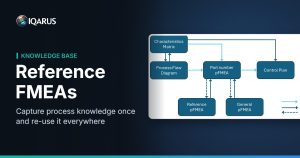
The Control Plan is not a standalone document. The process steps come from the Process Flow Diagram, the characteristics from the drawing and the Characteristics Matrix. The controls follow from the pFMEA: what is listed there as prevention or detection should come back in the Control Plan.
This is exactly where things often go wrong in practice. A new detection control in the pFMEA is not added to the Control Plan, or an obsolete process step remains in the Control Plan. See also FMEA in Excel: 5 pitfalls.
Creating a Control Plan in IQARUS
In IQARUS you create the Control Plan directly from the pFMEA and the Characteristics Matrix. Operation steps, characteristics and specifications stay synchronised, changes are highlighted, and you import prevention controls from the pFMEA with a single click. See the Control Plan module.
Ready to get started? With IQARUS you create linked pFMEAs, Process Flow Diagrams and Control Plans, with reference FMEAs that keep everything up to date. Try IQARUS free for 3 months, no account needed.